
Search for this app’s APK download and you’ll find one of India’s most-searched app queries, typed hundreds of thousands of times a month. Behind it is VidMate, a free Android video downloader with hundreds of millions of installs over more than a decade, despite never appearing on the Google Play Store. But popularity isn’t safety. This guide gives you the full, honest picture: what this app is, how it works, why Google keeps it out of the Play Store, what the real security concerns are, and the legal, safe ways to watch videos offline in 2026.

About this app
What Is VidMate?
VidMate is a free Android app whose job is simple: download videos and music from a huge range of websites and save them to your phone for offline viewing. It combines a built-in web browser with a download manager. Open a video page inside the app, tap the download button, and the app lists the available formats and resolutions, from small, data-friendly files up to high-definition where the source allows. A built-in media player then plays your downloads without leaving the app.
It is widely attributed to a Chinese development team known as VidMate Studio, the name listed on independent app directories like Uptodown and Filerox. Some download sites instead credit UC Web, but that claim is unverified. What is verified across sources is the genuine app’s package name: com.video.fun.app, one of the few reliable ways to spot the real app among hundreds of lookalike copies. Current directory listings put the latest widely distributed build at v6.0302 (September 2026), roughly 33.7 MB, requiring Android 5.0+. The app is free, needs no account, and is distributed only as an APK from outside the Play Store.
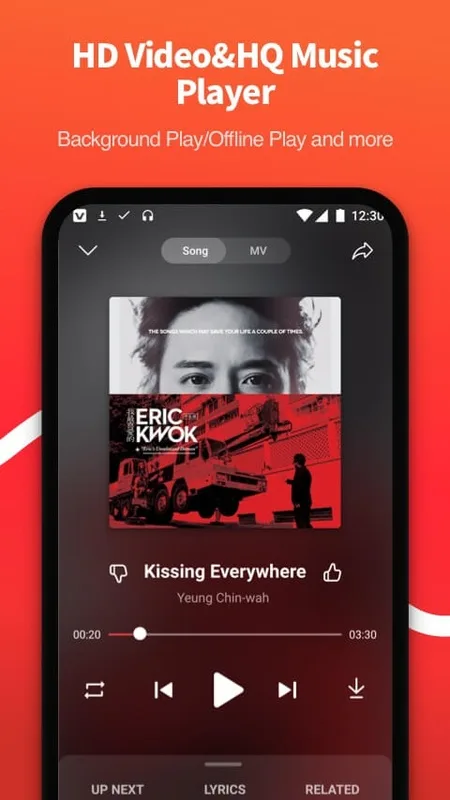
Official screenshot from the app’s Uptodown listing.
How VidMate Became a Household Name in India
Its story starts around 2013–2014, when mobile data in India was expensive and slow, and YouTube offered no offline mode. Saving a video to watch later without burning data was genuinely revolutionary, and this app arrived with exactly that pitch. By 2015–2016 it had exploded across Asia, Africa, and Latin America: completely free, supporting dozens of platforms, letting users pick quality from tiny 144p files to full HD, and downloading several videos at once in the background.
At its peak, the publishers claimed over 300 million downloads. Through the version 3.x–5.x era, it added Facebook, Dailymotion, Vimeo, TikTok and Instagram support, an in-app browser, a download queue, and music extraction, pulling audio from videos and saving it as MP3. Early builds were famously lightweight (a few megabytes), and longtime users still praise the 2016-era versions for speed compared to today’s heavier, ad-supported releases. In India, it became a default app on millions of phones, especially for users on limited data plans, which is exactly why searches for its APK still pull enormous volume a decade later.
Why VidMate Isn’t on the Google Play Store
If VidMate has hundreds of millions of users, why can’t you install it from the Play Store? The answer is Google’s developer policy, not the app’s popularity. Google prohibits apps whose primary function is downloading content from YouTube and similar streaming platforms without authorization. YouTube earns from ads and Premium subscriptions, and a free app that bypasses that model is a direct conflict of interest, so YouTube-download tools like this one, Snaptube, and TubeMate are all excluded.
What this does not mean: the Play Store has not judged VidMate to be malware. The block is a commercial and copyright-policy decision, not a safety verdict. But it does mean the app misses out on everything the store provides: automatic security reviews, Play Protect scanning, automatic updates, and a verified publisher identity. Those missing safeguards are risks you take on yourself with every sideloaded install.
What VidMate Can Actually Do
A download engine covering 1,000+ sites
The headline feature is breadth: YouTube, Facebook, Instagram, TikTok, Twitter, Dailymotion, Vimeo, Pinterest, SoundCloud, and hundreds more. Browse inside the app or paste a link, and the app detects the video and offers download options.
Quality, format, and MP3 choices
Before each download you pick the quality, typically 144p up to 1080p full HD, sometimes 4K where the source allows, plus formats like MP4 and 3GP. It can also extract the audio track as an MP3 at bitrates up to 256 kbps, which made it a favorite for building offline music collections.
Fast, background, resumable downloads
The downloader splits large files into chunks downloaded in parallel, a real speed advantage when connections were slow, runs multiple downloads at once, continues in the background, and lets you pause and resume. Handy when a connection drops halfway through a big file.
Browser, player, and extras
The integrated browser means you never leave the app to find content, and the built-in media player completes the loop: find, download, watch. Later versions added extras like a live TV section and trending recommendations, useful to some, bloat to longtime users.
Versions, Updates, and the “MOD APK” Copies to Avoid
The genuine app has evolved from the lightweight 1.x–2.x builds of the early years through the feature-expanding 3.x–5.x era to the current 6.x line (v6.0302 as of late 2026). Because it isn’t on the Play Store, you never get automatic updates, every new version must be downloaded and installed manually. Many users simply never update, running years-old builds with unpatched bugs.
That manual-update world is also a paradise for fakes. Search results are full of “VidMate MOD APK” builds claiming to be ad-free or “premium unlocked.” Some are repackaged genuine apps with extra ad libraries; others are outright counterfeits, including fake “Pro” versions that take payment through shady gateways. If you ever install the genuine app, the publisher’s own website is the only defensible source, and even then, scan the file with antivirus software first. Android gamers know this version-chasing routine well: our guide to the FC Mobile MOD APK Download Latest Version (2026) shows how update tracking should work for a legitimately popular title.
Will It Run on Your Phone?
Current builds need Android 5.0 or newer, covering the vast majority of Android phones, and the APK is about 33-34 MB. No account or registration is needed, and the app legitimately needs storage and network permissions to function.
Honest limitations: there is no official iOS version, any site offering “VidMate for iPhone” is a scam or a different app wearing the name. There is no official desktop version either. Older phones below Android 5.0 can hunt for legacy builds, but those are unmaintained and riskier. And watch for confusingly named clones, a similarly named downloader on the Play Store from an unrelated publisher has misled plenty of searchers.
The Security Questions Around VidMate
This is the section most download guides skip, and it matters most. Here’s what’s actually known, reported as reports rather than verdicts.
First, the allegations about the app itself. The app has faced criticism in security commentary for aggressive in-app advertising, full-screen and pop-up ads many users found intrusive, and there have been widely reported allegations that earlier versions transmitted user data to third-party servers without clear consent. The publishers have maintained the official build is clean and verified by security vendors, and app directories report clean antivirus scans for current builds. Both claims circulate; neither is fully settled, which is itself worth knowing.
Second, the ecosystem problem, more concrete. Because it exists only as APKs on third-party sites, the copies in the wild are a mixed bag. Security commentators have reported analyzing unofficial builds of the app and finding adware-style behavior, heavy background activity, and permission requests the genuine app should never make (contacts, SMS, call logs). In some reported analyses, copies contained hidden crypto miners or trojan payloads. The pattern is consistent: the further a copy is from the publisher’s own site, the riskier it gets. VidMate’s enormous search volume makes it one of the most impersonated apps in the Android world.
Third, the update gap. No Play Store means no automatic security updates and no Play Protect verification. An outdated downloader with broad storage and network permissions is a softer target than an app that updates itself monthly.
The honest summary: the genuine, current build appears to function as advertised, but the way most people actually obtain and maintain it exposes them to real risk, fake copies, stale versions, aggressive ads. If you use your phone for banking or work, that calculus should weigh heavily.
VidMate vs the Legal Alternatives
YouTube Premium and Premium Lite: official offline downloads
YouTube now sells exactly what most users of the app want. YouTube Premium in India costs ₹149/month for individuals (₹89 students, ₹299 family for up to six members) and includes ad-free viewing, background play, offline downloads, and YouTube Music Premium. YouTube Premium Lite at ₹89/month gained offline downloads and background playback for most non-music videos in early 2026, a genuine budget alternative. Downloads live inside the YouTube app: no sideloading, no malware risk, and creators get paid.
Netflix, Prime Video, Disney+ Hotstar: offline for shows and movies
Every major streaming service in India offers in-app downloads on mobile plans, higher quality, subtitles, and zero legal gray area compared to any downloader.
YouTube Music and Spotify: for the MP3 crowd
Much of its usage is really music: ripping audio from videos. YouTube Music Premium and Spotify Premium offer proper licensed offline downloads at good quality, without the compromises of a video rip.
The bottom line: VidMate’s unique selling point was never features, it was free. In 2026, official offline options start under ₹90 a month. For most people, that’s a small price for eliminating malware risk, legal exposure, and update headaches.
The Honest Pros and Cons
Pros
- Completely free, no subscription, no account, no registration.
- Enormous site support, over a thousand platforms in one app, unmatched by any official tool.
- Flexible quality and formats, 144p to HD video plus MP3 extraction.
- Runs on modest hardware, Android 5.0+ and a ~34 MB footprint suit budget phones.
Cons
- Not on the Play Store, manual sideloading, no Play Protect review, no automatic updates.
- Fake-copy minefield, one of the most impersonated APKs online; unofficial copies have been reported with adware and worse.
- Aggressive advertising, heavy in-app ads fund the free model; a constant user complaint.
- Copyright exposure, downloading copyrighted content without permission is illegal in many countries and violates platform terms.
- Unsettled privacy history, past data-transmission allegations were never fully put to rest.
Common VidMate Problems and Fixes
Downloads fail or stall
Usually the site, not the app: platforms regularly change their page structures, breaking third-party downloaders until the app updates. If downloads die across sites, check for a newer build, but if you’re current, the site may simply have blocked it.
The download button doesn’t appear
The page’s player may be unrecognized, or the app lacks storage permission, without it, the download option can silently fail. Try the app’s built-in browser rather than a pasted link.
Crashes or sluggishness
Clear the app cache and free up storage, nearly full phones choke download managers first. If crashes persist on old hardware, newer heavier builds may be too much for it; clinging to old versions trades stability for security, though.
Pop-ups and redirects after installing
If ads appear outside the app or strange pages open after install, you got a fake or bundled copy, not the genuine app. Uninstall it immediately, run a reputable mobile antivirus scan, and review granted permissions. This is the most common problem users report with it, and it’s almost always a counterfeit.
Myths About VidMate, Cleared Up
Myth: “Not on the Play Store means it’s a virus”
No. The absence is a policy decision about YouTube downloading, not a malware verdict. The real cost of that absence is no automatic updates and no verified publisher channel.
Myth: “Having VidMate on your phone is illegal”
The app itself isn’t illegal in most countries, it’s a tool. But downloading copyrighted movies, songs, or shows without permission is illegal in many jurisdictions, including India, and violates platform terms. The line is about what you download, not the icon on your home screen.
Myth: “MOD APK versions are better because they remove ads”
Backwards. Modified APKs from unknown uploaders are the highest-risk files in this ecosystem, the copies most frequently reported with injected adware and malware. Annoying ads beat dangerous “no ads” builds.
Myth: “VidMate steals all your personal data”
The genuine app needs storage and network, not your contacts or messages. The data allegations concerned earlier versions and were never proven. The practical rule: if any copy of the app asks for contacts, SMS, or call-log access, it’s not genuine, deny and uninstall.
Tips for Safe Offline Viewing
- Prefer official offline features. YouTube Premium Lite’s ₹89/month downloads, Netflix mobile downloads, and Spotify offline cover nearly every legitimate use case.
- Never sideload from a random link. If you install any APK outside the store, use the publisher’s own site, verify the package name, and scan the file first.
- Audit permissions ruthlessly. A downloader needs storage and network. Contacts, SMS, or location requests are red flags, deny them.
- Update or delete. An unmaintained sideloaded app is a liability. Stop using it? Uninstall it.
- Separate sensitive stuff. Don’t run gray-area apps on the same profile where you do banking.
- Respect creators and copyright. Save only content you have the right to, Creative Commons videos, your own uploads, explicitly downloadable material.
These habits pay off across all of Android, not just video apps. Users who stick to verified sources and stay updated run into far fewer problems, whether they’re downloading videos or following the latest builds of games like the Minecraft MOD APK Download Latest Version (2026).
Should You Use It
VidMate earned its fame honestly: it solved a real problem, expensive data and no offline mode, for hundreds of millions of people, for free. The genuine app does what it promises. But the same search volume that made it a household name turned it into one of Android’s most impersonated apps, and sideload-only distribution makes every install a small gamble on which copy you actually got.
In 2026, the honest recommendation is this: if your goal is simply watching videos offline, the legal options have caught up. YouTube Premium Lite at ₹89 a month gives official offline downloads with zero malware risk, automatic updates, and no copyright exposure, while supporting the creators you watch. VidMate remains a capable free tool, but the fake-copy minefield, aggressive ads, manual update burden, and copyright gray area make it a poor trade for most people.
If you choose it anyway, do it with eyes open: publisher’s website only, verify the package name, scan the file, deny permissions beyond storage and network, keep it updated, and never download copyrighted content you don’t have the right to save. Tools don’t keep you safe, habits do.
VidMate APK Download: Frequently Asked Questions
What is VidMate used for?
A free Android app for downloading videos and music from sites like YouTube, Facebook, Instagram, and TikTok to watch offline, with quality choices and MP3 extraction.
Why isn’t VidMate on the Google Play Store?
Google’s policy prohibits apps that enable downloading from YouTube and similar platforms, so VidMate is distributed only as an APK. That’s a policy decision, not a malware verdict.
Is VidMate safe to install?
The genuine current build functions as advertised, but real-world risk comes from unofficial copies, widely reported with adware, spyware, and excessive permissions, plus past data-transmission allegations. If you install it: publisher’s site only, verify package name (com.video.fun.app), scan the file, keep it updated.
Is VidMate free?
Yes, free, no subscription, no account. In-app ads fund it. Any “Pro” version asking for payment is a known scam pattern.
Is VidMate available for iPhone?
No. There is no official iOS version; any site offering it for iPhone isn’t distributing the genuine app.
Is downloading videos with VidMate legal?
The app itself isn’t illegal in most countries, but downloading copyrighted content without permission is illegal in many places and violates platform terms. Your own videos, Creative Commons content, or explicitly downloadable material are fine.
What is the latest VidMate version?
As of late 2026, the most widely listed build is v6.0302 (September 2026), ~34 MB, Android 5.0+. With no auto-updates, verify on the publisher’s own site rather than trusting third-party listings.
What are the best legal alternatives?
YouTube Premium (₹149/month in India) or Premium Lite (₹89/month) for official offline downloads; Netflix, Prime Video, or Disney+ Hotstar in-app downloads for shows and movies; YouTube Music or Spotify offline for music. Safer, legal, and they support creators.
What’s new
Updated September 2026 · Free · current build with updated site support and performance fixes